


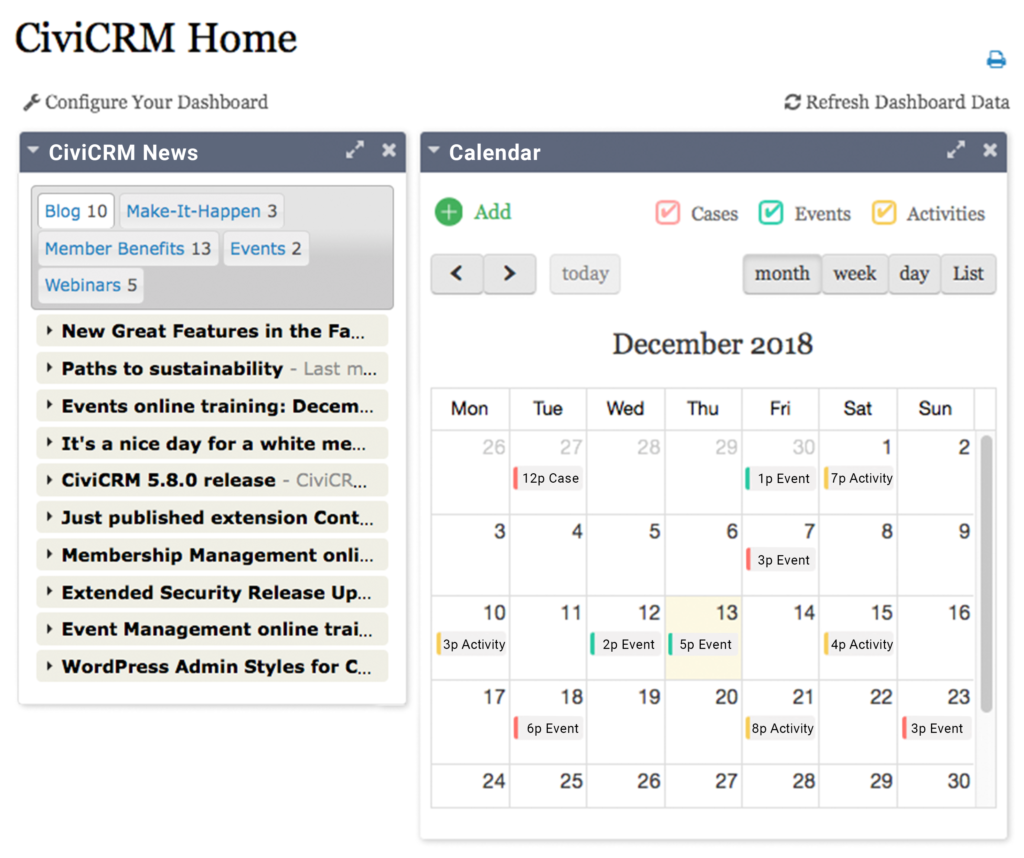
New Version of Graphical Calendar and Calendar Dashlet Released
At the end of this February Agiliway released the updated version of our Graphical CRM Calendar. Now CiviCRM extension contains a number of new cool features which make its use much easier and much more comfortable.
First of all, we updated CiviCalendar to support the latest version of CiviCRM.
Also, the functionality of the Calendar was significantly extended comparing to the original version of the extension released a few months ago (you can find the information about the first version of CiviCalendar here). Additionally, we cleaned the code and fixed a couple of bugs.
Among the most important new features we should highlight the following:
- Calendar Dashlet – Now it is possible to put CiviCalendar on your Home dashboard! Calendar dashlet helps a user to keep an eye on all the set events and activities. Therefore it will save one’s time and will give the possibility to follow all the upcoming events that have been indicated.

- List View – Besides the time periods (month, week, day) visible on the Calendar chart a user will be able to track all the events with the help of List option. Thus, the variety of activities and plans will be clearly shown on the page opened without looking for them one by one.

- Show or Hide Past Events – In case of need, a user can hide all the past events so that the outdated information will not distract one’s attention and therefore only new activities will be visible on the CRM Calendar.
- Scroll Pane Start Time – Now a user is able to define a workday beginning hour and the Calendar will show the time grid starting from a specified hour (for Weekly and Daily View). Such option allows showing events and activities in the calendar without extra spacing on a page.
- Time Format and Day/Month Format – a new version of the Calendar extension allows customizing time and date format preferences corresponding to a user’s country standards.
- Supporting 73 Locales – Basically, CiviCalendar covers most countries and languages which are currently supported by CiviCRM.

Taking into account all the new updates, the Settings panel of CiviCalendar has been significantly expanded in order to allow a user setting calendar view in the most convenient manner.
To benefit from new Calendar features and Calendar dashlet please download CiviCalendar extension from CiviCRM Extensions library, install and activate it within the CiviCRM Extensions tab of the administration panel. Enjoy!
In case you have any suggestion for improvements please do not hesitate to write us at civicrm@agiliway.com
